I own two Debian machines that I only half understand.
One is a server.
That limits the possibilities, and I probably stuck to my own habits back then — data in /srv, config next to it or in /etc — so the archaeology should be easy.
The other one is a shell server, a headless workstation, and I have no idea what I did to it since the day I installed it.
Replacing both with something declarative has been on my list for a long time. It is a long list.
Whenever I have to log into one of them, I first have to dig: what is this machine supposed to do? Which of the changes to the base installation were deliberate? Which of them are still needed? Nobody can tell me, because the person who made those changes was me, and I did not write anything down.
Manual changes to anything make me nervous. This article is about why, and about the tools I went through on the way.
ssh is a defect
Kristian Köhntopp put it best in a talk from 2015:
I have been known to annoy people with saying that “Whenever you are using ssh, you might as well open a ticket.”
If you need to login to a box manually to look something up, you are looking at a monitoring defect - make a ticket for that. If you need to login to a box manually to change something, you are looking at an automation defect - make a ticket for that.
He adds: “I have literally been beaten for saying that.”
I agree with him, with one exception. For one-off debugging, it is fine to log in and look around; not every question deserves a dashboard. But the second half has no exception for me: if I log in to change something, that change is lost the moment I log out — not from the machine, but from everybody’s knowledge of the machine.
How I got here
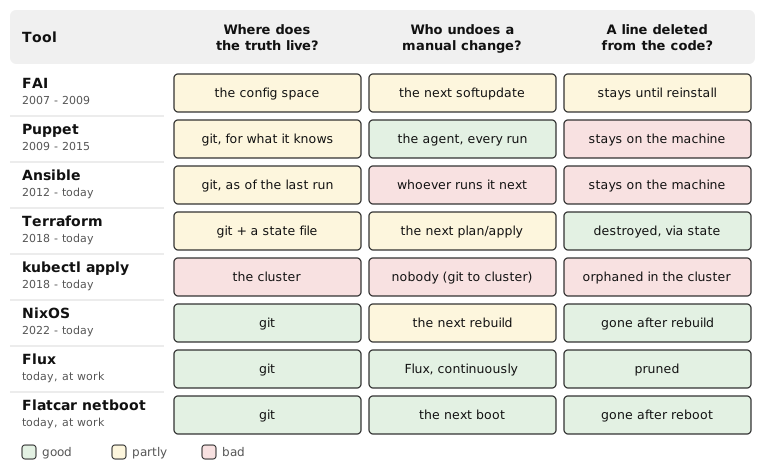
FAI (2007 — 2009)
My first contact with all of this was a student job: the workstations and servers of a chair at university, about 20 machines, installed with FAI, the Fully Automatic Installation. The setup existed before I started; I mostly had to live with it.
It taught me that immutable machines are wonderfully easy to reason about. A machine is whatever the installation made of it, and if it is not, you reinstall it.
It also taught me the price. Every small change — “why can’t I just install this package?”, “why can’t I just edit that file?” — became harder than it felt like it should be.
FAI does have an answer for day 2: a softupdate runs the configuration over an installed machine again, without reinstalling it. But removing something from the configuration does not remove it from the machine; you have to remove it explicitly. That gap will come up again.
One thing from FAI I still use today: its classes.
Every machine has a list of them, from DEFAULT to its own hostname.
In between is whatever the class scripts decide, like GUI or LAPTOP.
Every file can exist once per class:
files/etc/nsswitch.conf/DEFAULT
files/etc/nsswitch.conf/LAPTOP
files/etc/nsswitch.conf/ankh
When FAI installs /etc/nsswitch.conf, it takes the variant of the most specific class the machine has.
That was all it took for about 20 machines that were mostly the same, with a few exceptions.
There are no templates and no merging, just whole files. An ls shows you which machines are special.
I liked it so much that I copied it, twice.
In 2009, I started yacs for my dotfiles and the handful of files in /etc I care about.
It uses the same layout: HOME/.zshrc/DEFAULT, HOME/.zshrc/WORK, HOME/.zshrc/<hostname>.
Which classes a machine has is in a file classes.<hostname>.
That is not GitOps — nothing reconciles anything.
But every deliberate change to a dotfile ends up in git.
The second copy comes further down, in NixOS.
Puppet (2009 — 2015)
Puppet was rather good. It keeps the machine converging towards a description, with an agent that runs again and again, so a manual change does not survive for long. Speed was never something I praised it for.
Two things stuck with me.
The first one is the deletion gap.
Puppet only knows about what you told it.
If you remove a resource from the manifest, Puppet does not remove it from the machine; it simply stops caring about it.
To get rid of something, you have to write ensure => absent, deploy it everywhere, and only then delete that line.
So the machine still accumulates history, just more slowly.
The second one is the way back. When an agent run failed, it was not obvious how that news would ever reach a human. The configuration flows from git to the machines; the information “this did not work” has no such clear path in the other direction.
Ansible (since 2012)
Ansible is slow, and it has the same deletion gap: delete a task, and whatever it created stays where it is.
Its error messages, on the other hand, come in clearly: you run it, and you see right there what broke. That is also its weakness. Nothing runs unless somebody runs it, and between two runs, the machines can drift wherever they like. A playbook that nobody has run for six months is not configuration; it is documentation, and it may be wrong.
And idempotency is hard. Every shell: task is a small promise that running it twice does no harm, and nobody checks that promise until it is broken.
Terraform (since 2018)
Terraform became my go-to tool to control everything that has an API: kubernetes, DNS, external services, and so on.
It is also the most serious attempt at closing the deletion gap I know: Terraform remembers what it created, so if you delete a resource from the code, it deletes it from the world. The price for that memory is the state file. Where do you keep it? How do you lock it? How do you move a resource from one module to another without destroying and recreating it? How do you import things that were created by hand? The deletion gap is real, and closing it costs complexity.
Kubernetes (since about 2018)
Kubernetes has reconciliation built in, which I have written about before. Change a Deployment by hand, and the controllers will make the world match it.
But it took me a while to understand that this only moves the problem up one layer.
I installed my clusters with kubeadm and then kubectl apply-ed some manifests.
The cluster now reconciled itself towards its documents — but who reconciled the documents with what I meant?
kubectl edit is just ssh with extra steps.
The manifests need to be in git, and something has to keep git and the cluster in sync.
NixOS (since 2022)
NixOS is the most complete version of the idea I have found so far. The whole machine — packages, services, users, config files — is one data structure, in git, built into a system. For everything it manages, rebuilding gives you exactly what the description says, and nothing that is no longer in it. And if the new generation is broken, you boot the previous one.
I run it on workstations and on servers. It is where FAI’s promise — the machine is what the description says — finally comes without FAI’s price: changing the description is cheap.
FAI’s classes came along. The classes themselves changed over the years, but the idea did not. They live in the flake for my machines now:
{
  anvil  = [ "WORK" "LAPTOP" "ZFS" "GUI" "NIXOS" "SHELL" "DEV" ];
  jarvis = [ "NIXOS" ];
  hammer = [ "WSL" "SHELL" "DEV" ];
  default = [ ];
}
A module that needs to know checks the list:
hasGui = builtins.elem "GUI" classes;
The hostname class is now a directory hosts/<hostname>/.
Instead of one file per class, there are conditions in the modules.
That costs me the ls; to see what is special about a machine, I have to grep.
In exchange, a module still does not care which machine it runs on, only whether that machine has a GUI.
This also works without NixOS: the WSL instance at work gets its packages with nix profile, chosen by its classes.
At work, we have a second version of that: Flatcar Linux, netbooted, with a configuration that is generated on the fly at every boot. That is FAI again, immutable machines, but with cheap changes. It deserves an article of its own, about netbooting in Clos networks.
Backups, redeployments, migrations
Being nervous about manual changes is not an aesthetic preference. It comes up again and again, in three costumes.
Backups. What do you back up from a machine? In the end, everyone just takes a full disk image, because nobody knows which parts matter. But the only interesting part of a machine is its diff to the base installation: the data, plus every deliberate change. If the deliberate changes are in git, the backup shrinks to the data.
Redeployments. They happen all the time. New workstation: what do I install again? New availability zone for our mail server: what needs configuring there? If the answer is “whatever the old one has”, you are doing archaeology again, under time pressure.
Migrations. One of my first jobs was to replace a proxy and mail server with a new machine. In the end, both ran in parallel for years, because some services could not be reconfigured to use the new one. The problem was not the server. Nobody knew who was still talking to the old one, because part of the configuration lived on the clients, in places that were not in any repository.
All three are the same question: what does this machine actually consist of?
If the answer is in git, it is a git log away.
Everything-as-code is not GitOps
These are two different things, and I keep them apart.
Everything-as-code means: every deliberate change goes through a tool, and the tool’s input is in version control.
That is the part that matters to me.
How the change gets from git to the machine is secondary.
A human running ansible-playbook or terraform apply from a checked-in repository is perfectly fine.
GitOps adds one thing: reconciliation. Something watches git and keeps the world in sync with it, continuously, without anyone pressing a button. At work, that is Flux, which keeps git and our kubernetes clusters in sync, and prunes what has been deleted from git.
This blog, by the way, is not GitOps.
A Jenkins job builds the image from a git repository, and the cluster it runs in is kept in shape by a bit of Ansible and some folders of manifests that get kubectl apply-ed.
That is fine.
Everything is in git, there is a tool for every change, and nobody needs to ssh anywhere.
My NixOS machines are not GitOps either.
A Jenkins job updates the flake and builds every host, but a machine only changes when I run nixos-rebuild on it.
The description is complete; the reconciliation is me.
GitOps is the stronger guarantee. Everything-as-code is the part you cannot skip.
Where it gets hard
Secrets are the classic objection: “we cannot put passwords into git”. They are hard, but solvable. sops and git-crypt encrypt them inside the repository, so the diff is still there, just not readable for everyone. Or you keep them in OpenBao and only reference them — although OpenBao itself then needs to be configured, which in my case means Terraform. It is turtles all the way down, but at least the turtles are in git.
State is the other one. Terraform’s state file is the price for closing the deletion gap, and it is a price, not a free lunch. Flux pays the same price differently: it keeps track of what it applied, so it knows what to prune.
Six months from now
Things that are not in git — or anywhere else with a clear changelog and a diff — are hard for teams to work on. You cannot review a change you cannot see. You cannot ask “why?” about a line that has no commit message. You cannot roll back to a version that was never recorded.
If it is in git, it works the other way around.
The Roundcube in my cluster has memory_limit=128M in its PHP config.
Recently I wondered where that number came from — probably some tutorial?
git blame told me: a commit from 2022, “update roundcube php-config to allow for larger e-mail attachements”.
It copies the PHP config of the upstream image and changes three values: the two upload limits go from 5 MB to 100 MB, the memory from 64 MB to 128 MB.
So it is upstream’s default, doubled for bigger attachments.
That commit is not even mine, and I still did not have to ask anybody.
That only worked because someone wrote a real commit message.
My own repository also has three commits called “bugfix”; git blame on those tells me what changed, never why.
“But I work alone” does not count. Look at my two Debian machines: the person who configured them knew exactly what they did, and that person is not around any more.
Six months from now, you are someone other than today. That is as good as a teammate.
Comments
With an account on the Fediverse or Mastodon, you can respond to this post. Since Mastodon is decentralized, you can use your existing account hosted by another Mastodon server or compatible platform if you don't have an account on this one. Known non-private replies are displayed below.
Learn how this is implemented here.