I recently got an upgrade to my house: fibre to the home. Actual fibre this time — the last one was a “Glasfaseranschluss” that ended in the basement, and the last few metres to my flat were still G.fast over copper.
Watching the new one being built was interesting in its own right. Between the distribution cabinets they pull seven 12mm conduits. Along the street those turn into twenty-two 7mm conduits, and from there exactly one 7mm conduit goes into each basement. All of them empty. The fibre itself is blown in afterwards, from the nearest distribution box — where it lands on a splitter.
A splitter. Not a switch, not a port on a line card. A piece of glass that takes the light from one incoming fibre and divides it onto, in my case probably, 32 outgoing ones.
Which raises a question I could not let go of: how do you run a network on a piece of wire that 32 households are shouting into at the same time?
One fibre, thirty-two houses
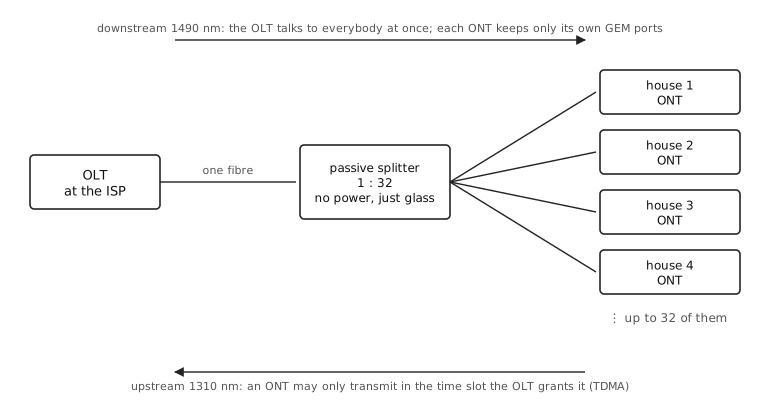
The technology is GPON, ITU-T G.984. The “P” is the interesting letter: passive. The splitter in that cabinet has no power supply, no management interface and nothing that can fail in a thunderstorm. It is glass. Everything clever happens at the two ends — the OLT at the ISP and the ONT in the house.
Downstream and upstream do not even use the same colour of light: 1490 nm down, 1310 nm up, on the same single strand.
Downstream, the OLT simply transmits to everyone. Every ONT on the tree physically receives every frame intended for all 32 houses, and throws away the ones that do not carry its own Port-IDs. If that made you uncomfortable, it made the standards people uncomfortable too, which is why downstream traffic is AES-encrypted with a key negotiated per ONT1.
Upstream is the harder direction, and the answer is plain old TDMA: an ONT transmits only during a time slot that the OLT has granted it. For that to work the OLT first has to range each ONT — measure how far away it is and hand it a compensating delay, so that a house 300 m down the street and one 4 km away still land inside their own slots and not on top of each other.
And inside all of that machinery? Ethernet frames. GEM — the GPON Encapsulation Method — exists to chop up and carry Ethernet frames. That is the whole payload.
Essentially, yes. If you want to watch somebody actually build one on a bench, apalrd’s adventures has a very good video about building a fibre optic ISP in a homelab.
So how do you get internet onto it?
Once you have Ethernet, you have the same problem as every office in the world: hand out addresses and route packets. The obvious answer is the one your LAN already uses — DHCP, and the ISP’s router just forwards for you. Plenty of ISPs do exactly this, and it is usually called IPoE.
Here in Germany you instead get PPPoE (RFC 2516): before any IP happens, your router opens a session, authenticates with a username and password, and only then is given an address. It buys the ISP per-subscriber authentication and accounting that does not depend on trusting the access network, and it lets the line and the ISP be two different companies — which is rather the point in a market built on wholesale access.
Finding somebody to open that session with works a lot like DHCP. Your router starts out not knowing who its ISP is, so it shouts: a PADI (Initiation) goes out as an Ethernet broadcast. Every access concentrator that is willing to serve you answers with a PADO (Offer), and from here on everything is unicast — your router now knows a MAC address. It picks one offer, asks for a session with a PADR (Request), and the concentrator confirms with a PADS (Session-confirmation) carrying a session ID. Broadcast discover, offer, request, acknowledge: squint and it is DHCP’s DISCOVER, OFFER, REQUEST, ACK. The difference is what you get at the end — DHCP hands you an address, PPPoE hands you a session ID and a peer MAC, and PPP (with the login) runs inside that session.
It also costs you eight bytes of every packet forever, which is why your MTU is 1492 instead of 1500, and why half of all “some websites just hang” tickets end in someone clamping MSS2. There are more trade-offs than fit here; DENOG has a whole talk on it, PPPoE vs IPoE: A Practical Guide for ISPs.
It was always like this
Here is the part I find genuinely funny. GPON felt exotic to me — lasers, splitters, time slots. But look at what its predecessor and its competitor are doing:
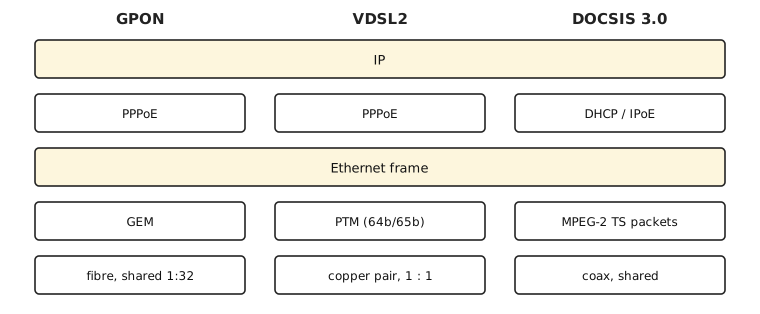
VDSL2 carries Ethernet frames too, in PTM, using 64b/65b coding. Only the older DSL flavours are different, and they are different in a much stranger way: ADSL puts your traffic into ATM cells first, 53 bytes at a time, which is its own kind of archaeology.
DOCSIS 3.0, over coax, takes Ethernet frames and stuffs them into 188-byte MPEG-2 transport stream packets — the same container as the television channels, so that data and TV can share a carrier3.
Three completely unrelated physical layers. Fibre with a passive splitter, a copper pair, a coaxial tree. And in the middle of all three, the same Ethernet frame, with the same IP packet inside it. Everything below is just a very elaborate way of moving that frame across the last kilometre.
At the end, everything is internet.
Funnily enough, the cable providers — the ones on the shared medium — are the ones who mostly settled on DHCP, while DSL, which is a private wire, is where we insisted on a login.
The tidbit that explains the e-mail
There is one practical consequence of the shared medium, and it caught me out.
On DSL there is a one-to-one link between your equipment and the ISP. Your pair goes to your port on the DSLAM and nowhere else. So you can plug in any modem you like and start a PPPoE session: the wire itself says who you are.
On GPON and DOCSIS the wire does not. Thirty-two houses share it, so before the network will talk to you at all, the operator must have your device on a list. For cable that is the modem’s MAC address. For GPON it is the ONT’s serial number — eight hex digits after a four-character vendor code — which sits on a whitelist in the OLT, usually together with a password, and the OLT simply ignores anything else that starts transmitting.
Which is why, when the construction crew was finished, nothing happened. What arrived was an e-mail with a link to “activate” my connection. I had assumed that was a billing formality. It is not: that is the moment my ONT’s serial number is put into the OLT’s whitelist, and it is the reason “just buy your own ONT” is a much bigger adventure than “just buy your own DSL modem” ever was.
And then there is the “real” internet
The whole time I was reading up on GEM frames and ranging, I kept comparing it to the other way I have had to get something connected: a rack in a data centre.
There you order a cross-connect. Somebody patches a cable in a panel, and it lands on a port of one of the ISP’s switches. That is the entire physical-layer story. No splitter, no modem, no time slots, no wavelengths.
Then you get an e-mail — an e-mail again, admittedly — saying roughly: your side is 2001:db8:1f::2/64, our side is 2001:db8:1f::1, VLAN 12344. You type those numbers into your router, and you have internet.
No session to open. No username and password. No DHCP. No device to register anywhere. The wire itself already answers the question that PPPoE sessions and ONT whitelists exist to answer — which customer is this? — because exactly one customer is on the other end of that port, and that end is in a locked cage with your name on it.
And when you want a whole subnet routed to you rather than a single address, there are again two styles, and it is recognisably the same argument as before:
- Static. “We will route 2001:db8:dead::/48 to your side of the transfer network.” One line in their router, a default route in yours, done.
- BGP. You bring your own AS number and address space, open a session across that same transfer network, and announce your prefixes.
Configured by hand versus signalled by a protocol. Which is DHCP versus PPPoE one layer up, with routes instead of addresses.
Also: the MTU is 1500. Nobody takes eight bytes off the top. And the addresses are simply yours — a whole /48, routed, no tunnel and no carrier-grade NAT anywhere in the path. Which is a strange thing to notice as a luxury, after writing a whole article about getting IPv4 home through an AFTR.
Strip everything else away and what is left is one Ethernet link with IP packets on it — exactly the two highlighted rows in the diagram above, the part all three access technologies already had in common, now with nothing stacked on top. GPON, DSL and DOCSIS never were the internet. They are the elaborate and surprisingly physical apparatus for getting your Ethernet frames to somebody who has one.
- So the neighbours cannot read your traffic. Upstream needs no such thing: the splitter only sends your light towards the OLT, and the other houses never see it. ↩︎
- A reader of the m-net article once wrote in with exactly this, for a tunnel rather than for PPPoE. Same 1492, same afternoon lost. ↩︎
- DOCSIS 3.1 moved to OFDM and away from MPEG framing, so this is slowly becoming a historical note. ↩︎
- A
/64for the link, or a/127if they are feeling modern (RFC 6164). The addresses here are the documentation prefix from RFC 3849, not anybody’s real ones. ↩︎
Comments
With an account on the Fediverse or Mastodon, you can respond to this post. Since Mastodon is decentralized, you can use your existing account hosted by another Mastodon server or compatible platform if you don't have an account on this one. Known non-private replies are displayed below.
Learn how this is implemented here.